

Quickfix AI
Quickfix AI provides instant, clear diagnostics of your computer's performance and health in plain English.
About Quickfix AI
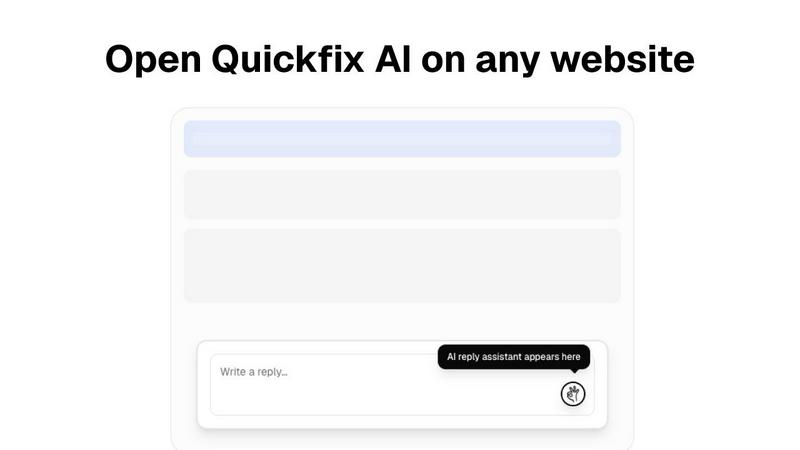
Quickfix AI is a dual-purpose productivity and diagnostic tool meticulously crafted to enhance efficiency and provide clarity. It serves as an AI-powered browser extension that automates writing replies across any website, allowing users to generate context-aware responses for emails, social media, support tickets, and chats with just a single click. This functionality eliminates the need for manual typing and tab-switching, streamlining communication for professionals. In addition to this, Quickfix AI functions as a comprehensive system diagnostics tool for both Windows and macOS. It delivers instant insights into the computer's performance, health, and security, analyzing key metrics such as CPU, memory, storage, battery, and network status. Users receive this information through an intuitive dashboard, accompanied by an integrated AI assistant that explains technical details in plain English while offering specific recommendations. Quickfix AI is designed for professionals seeking to enhance their communication efficiency and for a wide range of users, from casual computer operators to IT teams needing to troubleshoot system performance without requiring technical expertise.
Features
AI-Powered Response Automation
This feature allows users to generate quick, context-aware replies for various platforms with a single click. By eliminating manual typing, it significantly speeds up communication across emails, social media, support tickets, and chats.
Comprehensive System Diagnostics
Quickfix AI provides an extensive analysis of your computer's performance metrics, including CPU usage, memory pressure, storage health, and battery status. Users can easily monitor their system's health and performance levels through a user-friendly dashboard.
Integrated AI Assistant
The AI assistant interprets complex technical data and presents it in plain English. This feature ensures that users, regardless of their technical background, can understand diagnostic reports and receive actionable recommendations.
Instant Performance Insights
With Quickfix AI, users receive real-time insights into their system's performance and potential issues. The tool analyzes critical areas such as CPU, memory, and network status, helping users identify and resolve problems quickly.
Use Cases
Troubleshooting System Issues
When users experience performance problems but lack technical knowledge, Quickfix AI diagnoses the issues and provides clear explanations. This enables users to understand their system and take appropriate actions.
Enhancing Productivity in Communication
Professionals can leverage Quickfix AI to streamline their communication processes. By automating responses, they can save time and focus on more critical tasks, significantly increasing overall productivity.
IT Support Simplification
For IT teams, Quickfix AI offers a seamless way to diagnose and troubleshoot systems remotely. By sharing a link and code, IT professionals can gain instant visibility into the performance of any machine, facilitating faster issue resolution.
Empowering Tech Enthusiasts
Gamers, developers, and power users can utilize Quickfix AI to gain deep insights into their system's performance. This knowledge allows them to optimize their setups for better efficiency and performance.
Frequently Asked Questions
Is Quickfix AI free?
Yes, Quickfix AI offers a free version that allows users to access its core features, including the AI-powered response automation and system diagnostics. Premium features may require a subscription.
Is my data secure?
Quickfix AI prioritizes user data security and confidentiality. It employs advanced encryption and data protection measures to ensure that your information remains secure during scans and interactions.
Do I need technical knowledge to use Quickfix AI?
No, Quickfix AI is designed for users of all technical backgrounds. Its user-friendly interface and integrated AI assistant provide clear explanations and recommendations, eliminating the need for technical expertise.
What information does Quickfix AI collect?
Quickfix AI collects performance metrics and diagnostic data relevant to your system's health and performance. This information is used solely for analysis and to provide actionable insights, adhering to privacy standards.
Similar to Quickfix AI
Kody Tools
Free collection of online developer utilities, code formatters, and digital converters designed to streamline your daily workflow.

What's on the menu
Smart translate any restaurant menu

Forms Plugin
The #1 Native Form Builder Plugin for Framer - No Code, No Embeds, No External Platforms.

HomeAnswerBook
Practical, independent guides to home repairs, maintenance, costs, troubleshooting, and everyday fixes.


BlazePDF
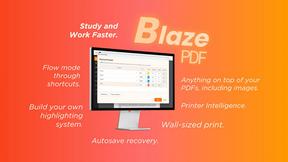
Highlight faster. Study in flow with custom shortcuts and a workflow built around you. Print smarter, or turn any page into a tiled poster.
