

AI tool Details
Explore More
Alternatives
About ProcessSpy
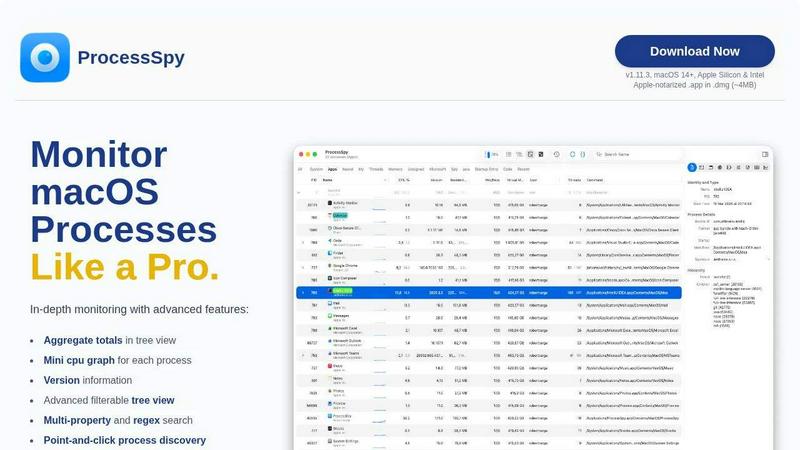
ProcessSpy is a professional-grade process explorer and system monitor built exclusively for macOS. It serves as the native, powerful alternative to tools like Sysinternals Process Explorer for Windows, revealing the hidden details of your system that the default Activity Monitor app does not show. Designed for developers, power users, and IT professionals, ProcessSpy provides deep visibility into every running process, its dependencies, and its resources. Its core value proposition is delivering comprehensive, real-time system intelligence through a fast, native Mac application. You can visualize complete process hierarchies, inspect open files and network connections, view environment variables, and instantly terminate unresponsive applications. With support for advanced filtering, JavaScript-based custom logic, and detailed historical tracking, ProcessSpy transforms system monitoring from a basic task into a precise and actionable workflow.
Features
Advanced Hierarchical Process Tree
ProcessSpy displays all system processes in a detailed, collapsible tree view that mirrors their parent-child relationships. This visualization is crucial for understanding which apps launched which services or daemons. The view goes beyond simple listing by showing aggregate totals for CPU usage, memory consumption, and thread counts for entire branches of the tree, providing immediate insight into resource impact of application groups.
Multi-Property and Regex Search
The tool features a powerful quick-search bar that supports searching across multiple process properties simultaneously using regular expressions. For example, you can find all processes with "java" in the name that also have a specific command-line argument like "-Xmx". This granular search capability allows for rapid pinpointing of exact processes, far surpassing the basic search in Activity Monitor.
JavaScript Filtering Engine
For ultimate control, ProcessSpy allows you to define custom filters using JavaScript. This enables the creation of complex, conditional logic to show or hide processes based on any available property, such as CPU usage thresholds, specific user ownership, or process start time. This programmable filtering is a professional feature for creating tailored monitoring views.
Comprehensive Process Context Menus
Right-clicking on any process, open file, network connection, or loaded library (dylib) brings up a context menu packed with relevant actions. This includes instantly killing processes, revealing files in Finder, copying detailed information, and more. These context-sensitive menus streamline common diagnostic and management tasks without navigating through multiple windows.
Use Cases
Developer Debugging and Profiling
Developers can use ProcessSpy to debug applications by inspecting exact command-line arguments, environment variables, and loaded dependencies. When multiple instances of similar processes (like different Java JDKs) are running, ProcessSpy distinguishes them by showing version info and full paths, which is essential for troubleshooting version-specific issues and memory leaks.
System Performance Analysis and Optimization
Power users and sysadmins can analyze system performance bottlenecks. The aggregate totals in the tree view quickly identify which application family is consuming excessive CPU or memory. Recording historical data (a paid feature) allows for tracking resource usage trends over time to pinpoint the source of slowdowns or spikes.
Security and Malware Inspection
ProcessSpy aids in security audits by revealing all running processes, including hidden daemons and launch agents. The ability to view process entitlements, signature information, and startup entries (paid features) helps verify the legitimacy of software and identify potentially unwanted or malicious programs lurking on the system.
Managing Stubborn and Unresponsive Applications
When an application freezes and won't quit normally, Activity Monitor often shows generic details. ProcessSpy allows you to precisely target the frozen process, see its child processes that may also need termination, and force-quit the entire tree instantly. This ensures complete closure of problematic software.
Frequently Asked Questions
Is ProcessSpy safe to install on my Mac?
Yes. ProcessSpy is Apple-notarized, meaning it has been checked by Apple for malicious content. It is distributed as a signed application inside a DMG file, ensuring its integrity. It is safe to use on both Intel and Apple Silicon Macs.
What versions of macOS does ProcessSpy support?
ProcessSpy is designed for macOS 14 (Sonoma) and newer. The developer specifically notes support for future macOS 26 (Tahoe), indicating a commitment to compatibility with the latest Apple operating systems and architectures.
What is the difference between the free and paid features?
The free version offers core monitoring: the advanced tree view, search, JavaScript filters, basic process info, and context menus. A one-time license unlocks advanced features like viewing environment variables, process entitlements, recording history, remembering finished processes, and exporting data to CSV.
How does ProcessSpy compare to the built-in Activity Monitor?
Activity Monitor provides basic overview data but hides critical details. ProcessSpy shows full command lines, distinguishes identical process names with version/path info, offers hierarchical views with aggregates, enables advanced search/filters, and provides deep inspection capabilities (like entitlements and environment variables) that Activity Monitor completely lacks.
Similar to ProcessSpy

MD to Text
Convert Markdown to clean, readable plain text in your browser. Strip formatting, keep the content, and copy clean output for AI prompts and docs.

SightRadar
Face recognition API, a drop-in replacement for AWS Rekognition. Index, search, compare and detect faces, billed per photo with no subscription.

StackLedge
Skip the prompt wrapper hype. StackLedge is a human-curated directory of verified AI tools, active SaaS platforms, and custom n8n workflows.

Product Launch Checklist
A free launch checklist for SaaS, apps, AI tools and more. Every step says why it matters and when you can skip it.

Forms Plugin
The #1 Native Form Builder Plugin for Framer - No Code, No Embeds, No External Platforms.



Happy Horse AI
Create videos from text, images, or references with Happy Horse AI using flexible 720P/1080P output and API workflows.