

AI tool Details
Explore More
Alternatives
About LoadTester
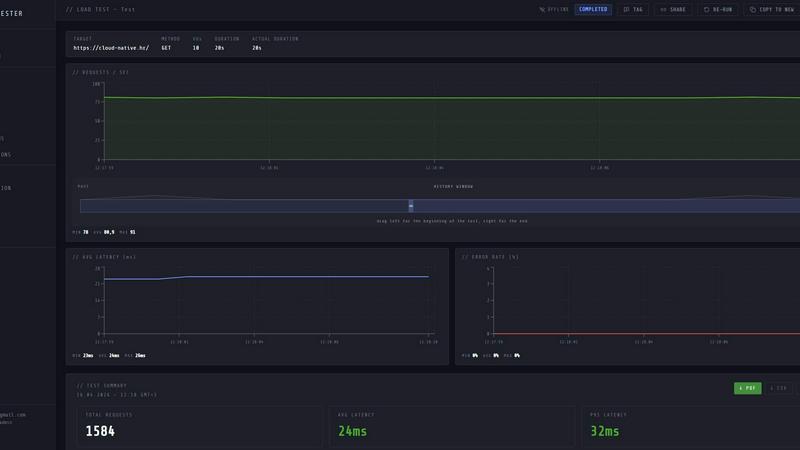
LoadTester is a modern HTTP and API load testing tool built by Cloud Native d.o.o. for engineering teams that need repeatable performance checks. It removes the painful parts of performance testing by eliminating infrastructure setup, worker orchestration, and scheduling headaches. Developers and teams can run application and HTTP load tests directly from their browser or CI/CD pipeline without provisioning any infrastructure.
The product focuses on simplicity and speed. Tests start in under three seconds from cold start to first request. LoadTester distributes tests across auto-scaling workers, supporting up to 10,000 virtual users and 10,000 requests per second. It provides live analytics during runs, including throughput, latency at p50, p95, and p99 percentiles, error rates, and active user counts. Teams can set auto-stop thresholds based on latency or error rate limits, compare runs to catch regressions, and schedule tests for nightly or pre-deployment checks.
LoadTester is built for real-world applications. It supports common HTTP methods including GET, POST, PUT, and DELETE. Users can choose between virtual user mode or requests per second mode to match their testing needs. The tool includes export capabilities for PDF, CSV, and JSON formats, webhook integrations, Slack and email alerts, and API access for workflow automation. A free plan is available, making it accessible for small teams and individual developers who want simple, repeatable performance checks without managing infrastructure.
Features
Instant Distributed Execution
Start distributed load tests in seconds with no infrastructure setup required. LoadTester handles worker scaling, infrastructure coordination, and execution flow automatically. Tests boot in under three seconds from cold start to first request. The platform dispatches workers instantly with zero queue time, supporting up to 10,000 virtual users or 10,000 requests per second per test. Teams can run multiple tests simultaneously across different endpoints without managing any servers or orchestration layers.
Live Real-Time Analytics
Watch requests, latency, failures, throughput, and bottlenecks in real time while your test is running. The live dashboard updates continuously with key metrics including current requests per second, p50, p95, and p99 latency, error counts, and active virtual user counts. A latency distribution chart shows trends over the last 60 seconds across percentile lines. This immediate visibility lets teams spot performance degradation the moment it happens, rather than waiting for post-run reports.
Smart Auto-Stop Thresholds
Set failure or latency thresholds that automatically stop tests when things go sideways. Configure auto-stop rules based on p95 latency limits, error rate percentages, or regression comparisons against baseline runs. When a threshold is breached, LoadTester halts the test immediately to prevent wasted resources and noisy data. Teams can also configure webhooks that trigger on completion, sending result links to release bots or notification channels like Slack and email.
CI/CD Ready with Integrations
Run tests on every deploy with full CI/CD pipeline integration. LoadTester provides API access for automated test execution, webhooks for result notifications, and direct integrations with Slack and email for alerts. Teams can schedule tests to run daily, nightly, or at specific times for release gates. Export results as PDF, CSV, or JSON for reporting. The platform supports workflow automation so performance checks become a repeatable, automated part of the development lifecycle.
Use Cases
Pre-Deployment Performance Gates
Run load tests automatically before every production deployment to catch performance regressions before users notice. Set up a test that simulates expected traffic patterns and configure thresholds for p95 latency and error rates. When a deployment introduces a regression that exceeds the threshold, the test fails and alerts the team via Slack or email. This prevents slow or broken API responses from reaching users and gives developers immediate feedback on the performance impact of their changes.
Spike Testing for High-Traffic Events
Prepare for traffic spikes during product launches, marketing campaigns, or seasonal events by simulating sudden increases in user activity. Create a spike test that ramps up to thousands of requests per second against critical endpoints like checkout or authentication. Watch live metrics to see how the system handles the load, where bottlenecks form, and whether error rates spike. Use the results to scale infrastructure or optimize code before the real traffic arrives.
Baseline Performance Monitoring
Establish performance baselines for key API endpoints and monitor them over time. Schedule daily or weekly tests that run the same scenario against production or staging environments. Compare each run against the baseline to detect gradual performance degradation caused by code changes, database growth, or configuration drift. The run-to-run comparison view highlights changes in throughput, latency percentiles, and error rates, making it easy to spot trends before they become incidents.
CI/CD Pipeline Integration for Continuous Testing
Integrate performance testing directly into the continuous integration and delivery pipeline. Trigger load tests automatically after every merge to main or before each release candidate. Use the API to start tests, poll for completion, and check results against defined thresholds. If a test fails due to performance regression, the pipeline can block the deployment and notify the team. This ensures every change is performance-verified before reaching production.
Frequently Asked Questions
How do I start a load test with LoadTester?
Create a test by providing a name, selecting the HTTP method (GET, POST, PUT, DELETE), entering the target URL, and choosing between virtual user mode or requests per second mode. Set the rate and duration, then click run. The test starts in under three seconds and dispatches workers automatically. You can watch live metrics including RPS, latency percentiles, and error counts as the test runs.
Do I need to set up any infrastructure to use LoadTester?
No. LoadTester handles all infrastructure provisioning, worker scaling, and execution coordination. You do not need to manage servers, configure load generator instances, or orchestrate distributed workers. The platform auto-scales workers based on your test parameters and runs everything from the cloud. This eliminates the operational overhead typically associated with performance testing.
Can I schedule tests to run automatically?
Yes. LoadTester supports scheduled tests that run daily, nightly, or at specific times. You can configure recurring tests for baseline monitoring, release gate checks, or pre-deployment validation. Scheduled tests execute automatically and can trigger webhooks, Slack notifications, or email alerts with results. This enables continuous performance monitoring without manual intervention.
What metrics can I see during and after a test?
During a live run, you see current requests per second, p50, p95, and p99 latency, error count and error rate, active virtual users, and a latency distribution chart showing trends over the last 60 seconds. After the test completes, you get a summary with total requests, average latency, p95, data sent, data received, and error details. Results can be exported as PDF, CSV, or JSON for sharing and analysis.
Similar to LoadTester

CloneWebsite
Clone any webpage pixel-perfect, export HTML/CSS/ZIP or React/Vue components.
Agent Pets
Your Claude Code & Codex sessions as pets in Chrome. Approve, deny and reply to your coding agents from any tab.
OG Image Generator
Paste a URL and AI designs on-brand Open Graph images from your page's colours, fonts and logo. Free, no sign-up.
VidhyaGen - Image Converter
Fast, free online platform with 100+ tools for image conversion, compression, editing, PDFs, and text utilities.

Ecommerce Data API
Amazon research data APIs for developers, sellers and AI agents. Integrate product, keyword and market research through REST APIs and MCP.

MD to Text
Convert Markdown to clean, readable plain text in your browser. Strip formatting, keep the content, and copy clean output for AI prompts and docs.
SightRadar
Face recognition API, a drop-in replacement for AWS Rekognition. Index, search, compare and detect faces, billed per photo with no subscription.