

JustFixMe
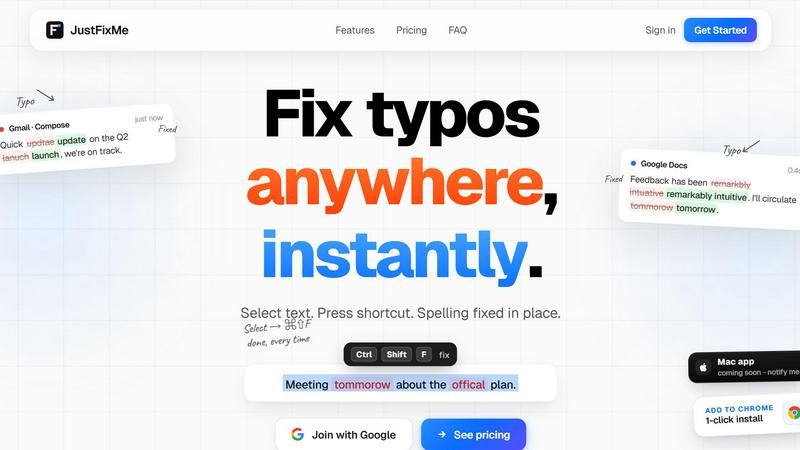
Fix typos anywhere instantly by selecting text and pressing one shortcut, no copy-paste needed.
About JustFixMe
JustFixMe is an AI-powered writing assistant designed to fix typos and rewrite selected text anywhere on the web, instantly. It operates as a lightweight Chrome extension that integrates seamlessly into your existing workflow. The core value proposition is simple: select any text in any input field, textarea, or contenteditable element on any website, press a single keyboard shortcut (Ctrl+Shift+F by default), and the text is rewritten in place. There is no need to copy, paste, open a new tab, or interact with a popup. The tool works across thousands of sites including Gmail, Slack, Notion, Linear, GitHub, X (formerly Twitter), Zoho, and Google Docs. JustFixMe is built for professionals, writers, developers, and anyone who types frequently and values speed and accuracy. The extension is paired to your account, ensuring your settings and usage are synchronized. Privacy is a core principle: your text round-trips to the AI model and disappears immediately. Nothing is stored, and your API keys are encrypted. JustFixMe offers two pricing models: a lifetime license for $29 where you bring your own OpenAI key, or a $9/month subscription where the AI cost is included. The product is currently in early access, with a leaderboard tracking real user fixes and a community-driven development approach.
Features
Fix Typos in Any Text Field, Instantly
JustFixMe works on every website and every input type within the Chrome browser. Whether you are composing an email in Gmail, writing a message in Slack, drafting a document in Notion, or leaving a code review on GitHub, the extension is active and ready. Simply highlight the text you want to fix, press the keyboard shortcut, and the AI rewrites your selection in place. The entire process takes under half a second for most corrections. This eliminates the friction of manual editing, spell-check popups, or switching to another application. The result is a seamless, uninterrupted writing flow where typos are corrected as quickly as you can select and press a key.
One Shortcut, Every Site in Chrome
The same muscle memory applies across all your web-based writing tools. JustFixMe uses a single, customizable keyboard shortcut (default: Ctrl+Shift+F) that works identically in Gmail, Notion, Slack, Linear, GitHub, X, Zoho, and every other text field in Chrome. You can bring your own key combination if the default conflicts with another application. This consistency reduces cognitive load and speeds up your editing process. The tool is designed to be invisible until you need it, sitting quietly in the background and activating only when you invoke the shortcut. This makes it ideal for power users who switch between multiple platforms throughout the day and need a reliable, universal fix.
Private by Default with Encrypted Keys
Your text is never stored or logged. When you use JustFixMe, the selected text is sent to the AI model for correction, and the result is returned directly to your browser. The text round-trips and disappears immediately. JustFixMe does not retain any history, logs, or copies of your writing. For users who bring their own OpenAI key (BYOK), that key is encrypted and stored securely. For subscription users, the AI cost is handled by JustFixMe, and no API key setup is required. This privacy-first approach ensures that sensitive business communications, personal messages, and confidential documents remain secure. You can use the tool with full confidence that your data is not being collected or analyzed.
Fix Modes: Typos Only or Light Rewording
JustFixMe offers two distinct modes to match your editing needs. The default mode is "Just Typos," which corrects spelling errors, minor punctuation mistakes, and obvious typos without changing your wording, tone, or sentence structure. This is ideal for quick fixes where you want to preserve your original voice. The second mode is "Light Rewording for Clarity," which not only fixes typos but also makes minor adjustments to improve sentence flow and readability. This mode is useful for polishing drafts or messages that need a slightly cleaner presentation. You can switch between modes at any time, giving you control over how much the AI modifies your text.
Use Cases
Professional Email Communication
Professionals who send dozens of emails daily often make typographical errors due to speed. JustFixMe allows them to quickly correct mistakes in Gmail or Outlook Web without leaving the compose window. Select the sentence with the error, press the shortcut, and the typo is fixed in place. This is especially useful for time-sensitive replies where a clean, error-free message is critical. The tool ensures that your emails maintain a professional standard without requiring a full proofreading pass. It also works in email threads, allowing you to correct typos in quoted text or replies.
Real-Time Chat and Messaging
In fast-paced environments like Slack, Discord, or X, typos can undermine credibility or cause confusion. JustFixMe lets you fix messages instantly before or after sending. Select the text in the message input field, press the shortcut, and the corrected version replaces the original. This is invaluable for customer support agents, project managers, and team leads who need to communicate clearly under time pressure. The tool works in threaded conversations, direct messages, and channel posts, ensuring your written communication is always polished.
Code Reviews and Technical Documentation
Developers and technical writers frequently write in text fields on GitHub, Linear, or Notion. Typos in pull request descriptions, code comments, or technical documentation can reduce clarity. JustFixMe allows you to highlight the text in these fields and correct it without leaving the review interface. The tool respects code blocks and technical terms, focusing only on natural language typos. This is particularly useful for non-native English speakers who want to ensure their technical writing is accurate and professional. The speed of the correction means it does not interrupt the flow of a code review session.
Content Creation and Drafting
Writers, bloggers, and content creators often draft directly in web-based editors like Google Docs, Notion, or WordPress. JustFixMe provides a quick way to clean up typos during the drafting process. Instead of manually scanning for errors or running a separate spell-check, you can highlight a paragraph, press the shortcut, and have the typos fixed instantly. The "Light Rewording" mode is particularly useful here, as it can improve sentence flow without altering your intended meaning. This accelerates the editing process and allows you to focus on ideas rather than mechanics.
Pricing
JustFixMe offers two straightforward pricing options. The first is a Lifetime license for $29 (once, excluding VAT), where you bring your own OpenAI API key (BYOK). This plan includes unlimited fixes, the ability to choose any OpenAI model, access to both fix modes (typos only or light rewording), and all future updates. There are no recurring fees from JustFixMe. The second option is an AI-Included subscription for $9 per month (excluding VAT, cancel anytime). This plan requires no API key setup; you simply sign in with Google. It includes 500,000 words per month, fast modern AI that fixes spelling without altering your wording, and both fix modes. You can switch between plans at any time. Both plans are currently available during the early access period, with a special offer of the first month free for users who provide feedback and a short testimonial.
Frequently Asked Questions
Does it send my text anywhere?
Yes, your selected text is sent to the AI model for correction, but it is not stored or logged anywhere. The text round-trips from your browser to the AI and back, then disappears immediately. JustFixMe does not retain any history, copies, or analytics of your writing. Your API key, if you bring your own, is encrypted. This privacy-first design ensures your sensitive communications remain confidential.
Will BYOK cost more than $9/mo in API fees?
For most users, no. The $29 lifetime BYOK plan is cost-effective if you already have an OpenAI API key and use the tool moderately. Typical API costs for correcting typos are very low, often pennies per month for average usage. Heavy users who fix thousands of words daily may approach or exceed $9/month in API fees, but the subscription plan is available for those who prefer not to manage their own key or billing. You can switch between plans at any time.
Which sites does it work on?
JustFixMe works on every website within the Chrome browser that contains input fields, textareas, or contenteditable elements. This includes Gmail, Slack, Notion, Linear, GitHub, X, Zoho, Google Docs, WordPress, and thousands of others. The tool is not limited to a whitelist of sites; it activates on any text field you interact with. The only requirement is that you are using the Chrome browser with the JustFixMe extension installed and signed in.
Refund policy?
Yes, there is a refund policy. If the tool does not work for you, you can request a refund. The exact terms are handled by Creem, the payment processor. For specific refund inquiries, contact support at [email protected]. The product is in early access, and the developer is actively improving it based on user feedback. If you encounter issues, the team is responsive and will work to resolve them.
Similar to JustFixMe

X Growth Engine
The only app that uses your unique X feed to surface leads, opportunities, and customers - no searching, no manual lists
JsonTranslate
Translate JSON, Markdown, and TXT projects while preserving keys, paths, and i18n structure.

YT Video Summarizer
Turn Long YouTube Videos into Quick AI Summaries in Seconds.
ekstrakt
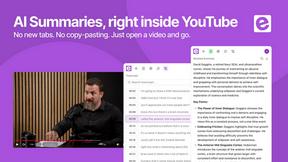
ekstrakt uses AI to create structured summaries and transcripts from any YouTube video, saving you hours of watching.
AI Quiz Solve
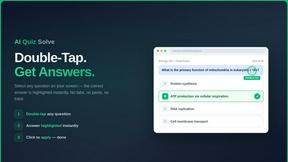
AI Quiz Solve instantly answers any online quiz question with explanations inside your LMS using a double-tap or screenshot.
SLABCALC - Crack Analyzer
Upload a photo of a concrete crack for an instant AI diagnosis with a failure mode, severity score, and a clear DIY or call an engineer.
Bolt Scraper
Bolt Scraper extracts business leads from Google Maps, Facebook, and more with unlimited data and auto captcha solving.
Unicode to Bamini Converter
Instantly convert Tamil text between Unicode, Bamini, and 20+ other encodings for free online.