

GIF Face Swap
Swap any face into any GIF instantly to create shareable animated memes with no editing skills required.
AI tool Details
Explore More
Alternatives
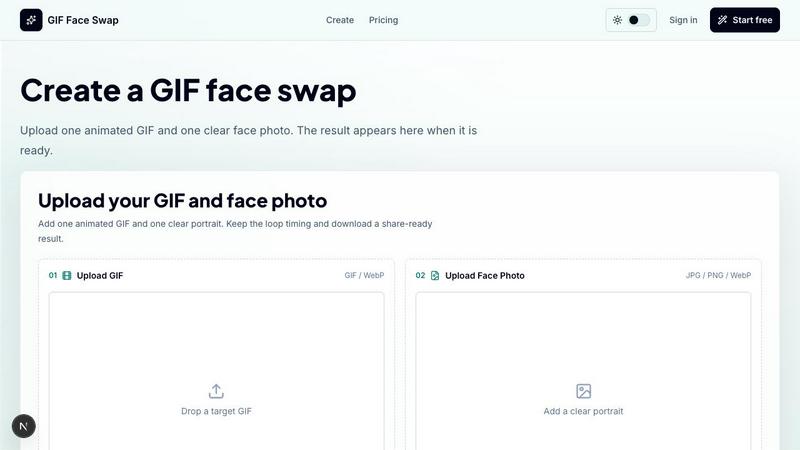
About GIF Face Swap
GIF Face Swap is an online tool for creating personalized animated GIFs with a face from your own photo. Upload a short GIF or WebP animation, add one clear face photo, and generate a face-swapped result without learning video-editing software. It is made for meme creators, social media users, friends, community managers, and teams who want a quick way to turn reaction GIFs into something personal and shareable. The workflow is simple: choose an animation, upload a face, generate the result, and download it when it is ready.
The product supports short animated files and focuses on a straightforward creation experience. You can try the tool before committing, then use credits when you need more generations. GIF Face Swap keeps the original loop timing, expression energy, and share-ready feel that make reaction GIFs work. Clear source faces and portraits produce more natural swaps with less blur and fewer missed frames. Uploads and finished GIFs stay private, with guest download links that expire. You can create your first watermarked result before signing up.
GIF Face Swap is built for meme makers, fandom editors, indie filmmakers, marketing teams, brands, and communities. It turns familiar reaction loops into fast posts, comments, group-chat replies, and short-form jokes. Users can put a friend, character, or creator face into anime, movie, sports, and game-adjacent loops without opening a full editing suite. The tool also helps test quick expressions, scene beats, and character reactions before heavier video work. Teams can make private joke loops for wins, retros, birthdays, and community moments where speed matters more than a full video editor.
The platform supports GIF and WebP formats with a maximum file size of 20MB for animations and 8MB for face photos. Short loops work best for clean results. Users can also access free GIF utilities like a compressor, analyzer, and converter before face swapping. The tool encourages users to upload only images and animations they have permission to use and to get consent before sharing face-swapped content. With a drag-to-compare slider, users can preview the original loop versus the swapped result before downloading.
Features
Built for Animated GIFs
GIF Face Swap is designed specifically for short animated files. It keeps the loop timing, expression, and share-ready feel that make reaction GIFs work. The tool supports both GIF and WebP formats with a maximum file size of 20MB. Short loops with one clear face produce the best results. The platform preserves the original animation's motion and framing, so the swapped face integrates naturally into the scene. You do not need to adjust frame rates, cut clips, or sync audio. The tool handles the technical details so you can focus on creating shareable content.
Cleaner Face Results
Clear source faces and portraits produce more natural swaps with less blur and fewer missed frames. The AI analyzes the face photo for key features like eyes, nose, and mouth position. It then maps those features onto each frame of the target animation. Using a front-facing, well-lit portrait improves the quality of the output. The tool works best with single-face animations where the subject is centered and close to the camera. This focus on clean input leads to smoother swaps that maintain the original character's expression energy.
Private by Default
Uploads and finished GIFs stay private, with guest download links that expire. You do not need to create an account to try the tool. Your source files are not stored indefinitely or shared publicly. When you generate a watermarked result, you get a temporary link to download or share it. After the link expires, the file is removed from the server. This privacy-first approach lets you experiment with personal photos or team content without worrying about unwanted exposure. You control who sees the final result.
Fast First Try
Upload one GIF and one face photo, then create your first watermarked result before signing up. The tool processes the swap in seconds, not minutes. You can preview the result with a drag-to-compare slider that shows the original loop next to the swapped version. This instant feedback lets you decide if the quality meets your needs before committing to a paid plan. If you want watermark-free downloads or more generations, you can upgrade later. The fast first try removes the friction of creating an account or entering payment details upfront.
Ready for Batch Editing
Creators can prepare multiple GIF ideas faster when they need a set of reactions or campaign loops. The tool supports batch processing for users who need to swap faces into several animations at once. This is useful for marketing teams creating a series of branded reaction GIFs or for content creators building a library of personalized memes. You can upload multiple target GIFs and face photos, then generate all the swaps in one workflow. Batch editing saves time compared to processing each swap individually.
Simple Credit Plans
Start free, upgrade for no watermark, and choose more credits only when you need more output. The free tier gives you one watermarked swap to test the tool. Paid plans remove the watermark and add more generations. Credits do not expire, so you can use them at your own pace. There are no monthly subscriptions or hidden fees. You pay only for what you use. This simple pricing model works for casual users who need a few swaps as well as power users who create dozens of animated face swaps regularly.
Use Cases
Meme Makers and Social Creators
Turn familiar reaction loops into fast posts, comments, group-chat replies, and short-form jokes while the trend is still moving. Meme makers can take a popular reaction GIF and swap in a friend's face or their own face to create a personalized version. The tool processes the swap in seconds, so you can post while the meme is still relevant. Social creators can use GIF Face Swap to engage their audience by inviting followers to submit faces for custom reaction GIFs. The share-ready output works directly on platforms like Twitter, Discord, and Instagram.
Fandom Editors
Put a friend, character, or creator face into anime, movie, sports, and game-adjacent loops without opening a full editing suite. Fandom editors can take iconic scenes from their favorite shows or games and swap in faces for humorous or tribute content. The tool preserves the original animation's timing and framing, so the result looks natural. You do not need to learn After Effects or Premiere Pro to create these edits. GIF Face Swap handles the complex face mapping across frames automatically, letting you focus on the creative concept.
Indie Filmmakers and Previs Artists
Test quick expressions, scene beats, and character reactions before spending time on heavier video work. Indie filmmakers can use GIF Face Swap to visualize how an actor's face would look in a specific animated scene or reaction shot. This helps with casting decisions, expression matching, and scene planning. Previs artists can swap faces into rough animations to check timing and emotional impact before committing to full production. The tool provides a fast, low-cost way to iterate on visual ideas.
Marketing Teams and Brands
Create lightweight campaign replies, launch reactions, mascot moments, and internal celebration loops from approved source files. Marketing teams can take a branded mascot or product GIF and swap in a team member's face for a personalized launch reaction. Internal teams can create celebration loops for wins, retros, and birthdays. The tool works with approved source files so you maintain brand consistency. Batch editing lets you produce a series of GIFs for a campaign in one session. The watermark-free upgrade ensures professional-looking output for external use.
Teams and Communities
Make private joke loops for wins, retros, birthdays, and community moments where speed matters more than a full video editor. Teams can take a reaction GIF from a popular movie or show and swap in a colleague's face for an inside joke. Community managers can create personalized GIFs for member milestones or event highlights. The privacy-first design means these swaps stay within the group. The fast turnaround lets you create content in real time during virtual meetings or chat conversations.
Frequently Asked Questions
What file formats and sizes does GIF Face Swap support?
GIF Face Swap supports GIF and WebP animations for the target file. The maximum file size for animations is 20MB. Short loops with one clear face work best for clean results. For the face photo, the tool accepts JPG, PNG, and WebP formats with a maximum file size of 8MB each. The face photo should be a clear, front-facing portrait with good lighting. Using a well-lit photo improves the quality of the face swap and reduces blur or missed frames.
Do I need to create an account to use GIF Face Swap?
No, you can try the tool without creating an account. The free tier gives you one watermarked swap to test the quality and workflow. You only need to sign up when you want to upgrade for watermark-free downloads or purchase additional credits. The guest workflow lets you upload a GIF and a face photo, generate the swap, and preview the result using a drag-to-compare slider. Your uploads remain private even without an account.
How does GIF Face Swap handle privacy and data security?
Uploads and finished GIFs stay private by default. Guest download links expire after a set period, after which the files are removed from the server. Your source images and animations are not stored indefinitely or shared publicly. The tool does not use your uploads for training or marketing purposes without explicit permission. You control who sees the final result through the temporary download link. This privacy-first approach lets you experiment with personal or team content safely.
Can I use GIF Face Swap for commercial or brand content?
Yes, marketing teams and brands can use GIF Face Swap for commercial purposes. The watermark-free upgrade provides professional-looking output suitable for external use. You should only upload images and animations you have permission to use. This includes obtaining proper licenses for source GIFs and getting consent from individuals whose faces appear in the swapped content. The tool works with approved source files to help maintain brand consistency across campaign materials.
Similar to GIF Face Swap

ImageGPT
ImageGPT is an all-in-one AI creative platform for generating, editing and transforming images and videos using AI.
AI Album Cover Maker
Create release-ready album covers from a prompt or photo. Generate, refine, and export art for singles, EPs, mixtapes, and playlists.

RunwayAI
Independent Runway AI video generator for text and image-to-video workflows, with task tracking, previews, downloads, and API access.
Sprite Sheet Maker
Create pixel-art sprite sheets from text with AI, preview animations, and export PNG assets for game prototypes.
AIEnhancer
AI photo, image and video creation in one connected workspace.

Hailuo AI
Create high-quality videos from text or images with guided prompts, motion and camera controls, flexible settings, task tracking, and downloadable res
GPT Image 2 API
Generate and edit production-ready images with GPT Image 2 API, prompts, reference images, clear text, and developer workflows.