

Bank Statement Engine
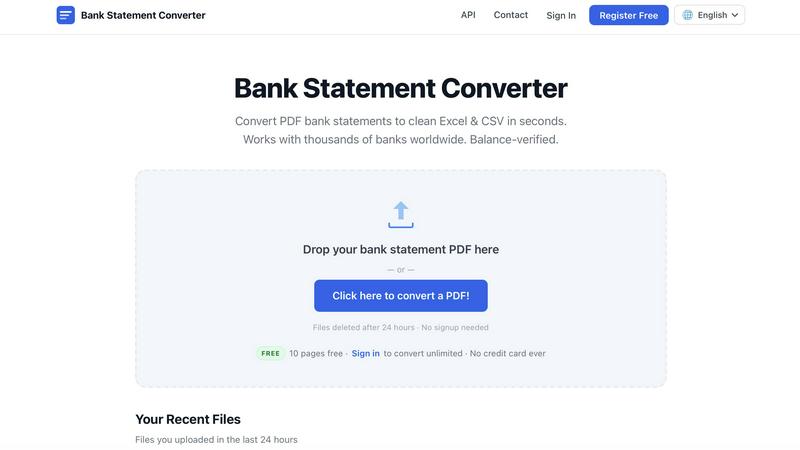
Convert PDF bank statements to Excel, CSV, or JSON instantly with no signup, no limits, and full privacy.
AI tool Details
Alternatives
About Bank Statement Engine
Bank Statement Engine is a free, online tool designed to convert PDF bank statements into clean, structured data formats like Excel, CSV, JSON, QBO, OFX, and QIF. It eliminates the tedious and error-prone process of manually entering transaction data from bank statements into accounting software, spreadsheets, or custom applications. The tool is built for speed and simplicity, requiring no signup, no account creation, and no credit card information to get started. Users can simply drag and drop their PDF files and receive converted data in seconds. The engine supports over 10,000 banks worldwide, including major institutions like Chase, Barclays, HDFC, SBI, and RBC, making it a versatile solution for a global user base. It also handles complex scenarios such as scanned PDFs using built-in Optical Character Recognition (OCR) and password-protected statements. Privacy is a core feature; all uploaded files are automatically and permanently deleted from the servers after 24 hours, and all data transfers are secured with HTTPS encryption. For developers and businesses needing deeper integration, a REST API is available. The tool is specifically designed for accountants, bookkeepers, small business owners, and developers who need to extract clean, accurate transaction data quickly and reliably, without the overhead of subscriptions or page limits for basic use.
Features
Global Bank Compatibility
Supports bank statements from over 10,000 financial institutions worldwide, including major banks across the USA, India, UK, Europe, Australia, the Middle East, and Africa. This extensive compatibility ensures that users from virtually any region can process their statements without worrying about format issues or unrecognized layouts. The engine is continually updated to handle new statement formats.
Advanced PDF Handling
Capable of processing a wide variety of PDF types, including standard digital statements, scanned documents via built-in Optical Character Recognition (OCR), and password-protected files. This eliminates common barriers to conversion, allowing users to work with statements that would otherwise require manual data entry or specialized software. The OCR technology extracts text from images with high accuracy.
Multiple Output Formats
Export converted transaction data into a range of industry-standard formats to suit different workflows. Users can download data as Excel (XLSX) for spreadsheet analysis, CSV for import into accounting software like Xero or Sage, JSON for developers integrating via the API, or QBO, OFX, and QIF for direct import into QuickBooks and other financial applications. This flexibility ensures seamless integration with existing tools.
Privacy and Security First
All uploaded PDF files are processed on secure servers and are automatically and permanently deleted after 24 hours. Data is protected with HTTPS encryption during transfer, ensuring that sensitive financial information remains confidential. No signup or account is required for basic use, meaning no personal data is stored. This commitment to privacy is a core differentiator for the service.
Use Cases
Accounting and Bookkeeping Automation
Accountants and bookkeepers can rapidly convert client bank statements from PDF into Excel or CSV format. This automates the data entry process, reducing hours of manual work to just a few seconds. The clean, structured output can be directly imported into accounting software like QuickBooks, Xero, or Zoho Books, allowing professionals to focus on analysis and advisory services rather than tedious data transcription.
Small Business Financial Management
Small business owners can quickly convert their monthly bank statements into a digital format for budgeting, expense tracking, and financial reconciliation. By exporting to Excel or CSV, they can easily categorize transactions, monitor cash flow, and prepare reports for tax purposes. The tool’s free tier and lack of signup requirements make it an accessible solution for businesses with limited resources.
Developer and API Integration
Software developers can use the REST API to integrate bank statement conversion directly into their own applications, platforms, or workflows. This is ideal for building fintech tools, expense management systems, or data aggregation services. The API provides programmatic access to the same powerful conversion engine, allowing for automated, high-volume processing of financial documents.
Personal Finance and Budgeting
Individuals can use the tool to convert their personal bank statements into Excel or CSV for use in personal finance software or custom budgeting spreadsheets. This makes it easy to track spending, analyze income patterns, and create detailed financial plans. The ability to handle statements from thousands of banks worldwide ensures that users from different countries can all benefit from the service.
Pricing
The service offers a straightforward, free pricing model with no hidden fees or credit card requirements. The anonymous free tier allows users to convert up to 10 pages per day without needing an account, providing access to CSV and Excel downloads, support for password-protected PDFs, and a 24-hour file history. For users who need more, a free registered account unlocks unlimited pages, the ability to bulk convert multiple files, and all the features of the anonymous tier. This registered tier also requires no credit card. The service does not have any paid subscriptions. For clients requiring custom document processing or API integration, bespoke services are available by contacting the team.
Frequently Asked Questions
How do I convert a PDF bank statement to Excel?
Simply visit the Bank Statement Engine website, drag and drop your PDF file onto the upload area, or click to select a file from your computer. The tool will process the statement automatically. Once complete, you can choose to download the converted data as an Excel (XLSX) file or in other formats like CSV. No signup or account is required for this basic process.
Is my bank statement data secure?
Yes, security is a top priority. All files are transferred using HTTPS encryption, which protects your data during upload and download. Once a file is processed, it is stored temporarily and then automatically and permanently deleted from the servers after 24 hours. The service does not retain your data beyond this period, and no personal information is required to use the tool.
Can I convert a scanned bank statement?
Yes, the tool includes built-in Optical Character Recognition (OCR) technology that can read and extract text from scanned PDF images. This allows you to convert statements that are not digitally generated, such as those received as scanned copies from a bank. The OCR engine is designed to accurately recognize text from a wide variety of statement layouts.
Is there an API for developers?
Yes, Bank Statement Engine offers a REST API for developers who need to integrate bank statement conversion into their own applications or automated workflows. The API provides programmatic access to the conversion engine, allowing for automated processing of PDF files. Detailed documentation is available on the website to help with integration and implementation.
Similar to Bank Statement Engine
BillionVerify
BillionVerify is a professional email verification service built to solve one problem: bad email data costs businesses money.

Product Launch Checklist
A free launch checklist for SaaS, apps, AI tools and more. Every step says why it matters and when you can skip it.


Forms Plugin
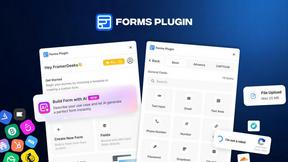
The #1 Native Form Builder Plugin for Framer - No Code, No Embeds, No External Platforms.