

AI Photo Online
Edit photos instantly with powerful AI tools, no signup or fees required.
AI tool Details
Explore More
Alternatives
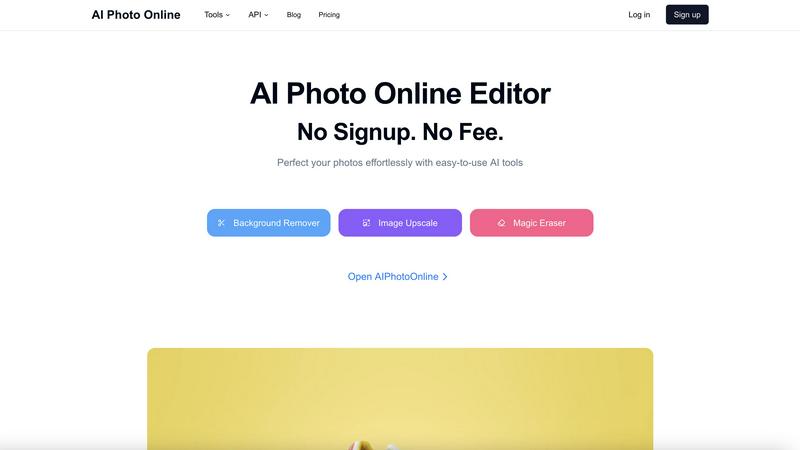
About AI Photo Online
AI Photo Online is a comprehensive, web-based platform that delivers professional-grade photo editing through the power of artificial intelligence. It eliminates the need for complex software by providing a suite of powerful, user-friendly tools directly in your browser. Operating on a core "No Signup. No Fee." model, it makes advanced editing accessible to everyone. The platform is designed for a wide audience, including social media users, e-commerce entrepreneurs, marketers, photographers, and content creators who require fast, high-quality image modifications. Its main value proposition is delivering effortless, precise control over photo editing. Users can instantly remove backgrounds, erase unwanted objects, upscale image resolution, and even generate new images. Beyond individual tools, AI Photo Online offers a virtual studio to create product photos and thousands of conversion-focused marketing templates, saving significant time and money compared to traditional photography and design processes.
Features
AI-Powered Background Remover
Instantly and accurately remove backgrounds from any image with a single click. The AI cleanly separates subjects from their surroundings, delivering a transparent or solid-color background perfect for product listings, profile pictures, and creative composites without manual outlining.
Magic Eraser for Object Removal
Effortlessly remove unwanted objects, people, text, or imperfections from your photos. This intelligent tool analyzes the image and seamlessly fills in the removed areas by generating matching content, leaving no trace of the original distraction.
High-Quality Image Upscaler
Increase the resolution and clarity of your images without losing detail. This AI tool intelligently enlarges photos, making them suitable for print, large displays, or improving the quality of old or low-resolution digital images for professional use.
Virtual Photo Studio
Create professional product photos without a physical studio or photographer. This feature allows you to generate stunning, studio-quality shots by placing your product into various AI-generated scenes and lighting conditions with just a few clicks.
Use Cases
E-commerce Product Listings
Create clean, consistent, and engaging product photos at scale. Remove backgrounds, upscale image quality, and use the virtual studio to generate multiple lifestyle shots, drastically reducing photoshoot costs and speeding up time to market.
Social Media & Marketing Content
Quickly produce eye-catching graphics for campaigns. Use templates, remove distracting elements from photos, and generate custom backgrounds to create polished content for Instagram, Facebook, ads, and blogs without design expertise.
Professional Photography Enhancement
Assist photographers in post-production by performing tedious tasks instantly. Upscale image resolution for large prints, remove accidental photobombers, or change backgrounds to achieve the perfect shot without hours of manual editing.
Personal Photo Editing & Fun
Perfect personal photos for profiles, invitations, or gifts. Easily remove blemishes or unwanted objects, create fun composites with new backgrounds, and enhance old family photos by upscaling them for better clarity and sharing.
Frequently Asked Questions
Is AI Photo Online really free to use?
Yes, the core online AI tools operate on a "No Signup. No Fee." model. You can access features like the Background Remover, Magic Eraser, and Image Upscaler directly in your browser without creating an account or paying. Advanced features, the virtual studio, API access, and high-volume usage may involve premium plans.
What kind of files does AI Photo Online support?
The platform supports all common image file formats, including JPG, PNG, and WebP. You can upload your photos directly from your device, and the processed images can be downloaded in high-quality PNG or JPG formats, depending on the tool used.
Do I need any technical skills to use the tools?
No technical skills are required. AI Photo Online is designed for simplicity. Each tool is built to be user-friendly, typically requiring just an upload and a single click to achieve professional results. The AI handles the complex processing automatically.
How does the Virtual Photo Studio work?
The Virtual Studio uses AI to generate realistic environments and lighting. You upload a product image, and the AI places it into a chosen scene (like a marble tabletop or a lifestyle setting), creating a professional product photo without the need for physical props, travel, or a photographer.
Similar to AI Photo Online
FaceCoda
Free AI attractiveness test and face analysis with private, on-device photo processing.
AIEnhancer
AI photo, image and video creation in one connected workspace.
Hailuo AI
Create high-quality videos from text or images with guided prompts, motion and camera controls, flexible settings, task tracking, and downloadable res
GPT Image 2 API
Generate and edit production-ready images with GPT Image 2 API, prompts, reference images, clear text, and developer workflows.

ProfileLoom
ProfileLoom turns one photo into platform-ready AI portraits for professional, social, and creator profiles, with presets and built-in editing.
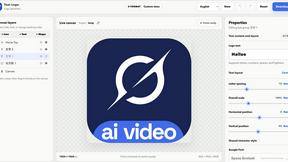
Text Logo
Create a custom text logo, wordmark logo, or typography logo with editable fonts, colors, icons, shapes, and flexible export formats.

Try This Skill
One-click AI photo stylization for e-commerce & portraits
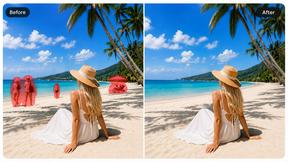
Magic Eraser
AI photo editor for removing objects and backgrounds, enhancing images, and creating polished visuals across web and mobile.